














Table of Contents
- • Aostsoft Review Summary
- • About Aostsoft
- • Other opinions about Aostsoft
- • Overview of Aostsoft
- • Aostsoft Review
- • Aostsoft PDF to Document Image Converter Pro Review
- • Aostsoft Document Image to PDF Converter Pro Review
- • Aostsoft Document Image to PowerPoint Converter Pro Review
- • Aostsoft Pros & Cons
- • Batch Conversion Features
- • Pricing and Licensing
- • Aostsoft Return Policy
- • Aostsoft Delivery and Access
- • Contact Information for Aostsoft
- • Where to buy Aostsoft?
- • Conclusion of Aostsoft reviews & ratings
Aostsoft Review Summary
Aostsoft is a software provider specializing in batch document and image conversion tools primarily for Windows users. It plays the role of a mid-tier, practical solution within the document conversion category, and generally delivers reliable performance with extensive format support and OCR capabilities. However, users may find its interface outdated and batch customization limited compared to competitors.
Highlights
- Suited for users needing batch processing of office documents and images
- Offers broad conversion formats including PDF, Office, OCR, and encrypted files
- Balances ease of use with interface age and limited mixed-format batch options
- Reliable tools with a 7.2/10 overall evaluation
Within the broader document conversion software market, Aostsoft stands as a functional, cost-conscious option among alternatives that offer more modern interfaces and advanced batch features. For a balanced perspective, see the Aostsoft review that discusses its fit relative to competitors such as Adobe Acrobat and Foxit PDF Editor.
About Aostsoft
Many professionals and individuals face challenges converting large volumes of documents and images into various formats while preserving their original layout. Efficient and accurate batch processing is critical for office productivity and document management. Without reliable tools, managing these conversions can be time-consuming and error-prone.
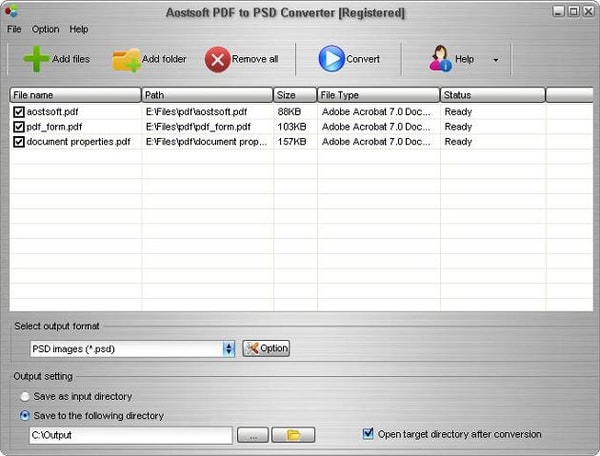
Aostsoft provides a range of standalone Windows software specializing in document and image conversion. It offers tools for converting PDFs, office files, and images across multiple formats, including OCR capabilities for text extraction. Positioned within the software industry, Aostsoft focuses on practical batch processing and format versatility.
The software is known for its ease of use and broad format support, including encrypted PDF handling and Microsoft Office files from 2007 to 2021. It has operated since at least 2010 and is well-regarded for its reliable batch conversion features. Users appreciate its standalone operation without needing Adobe Acrobat or third-party software.
This software is best suited for users needing straightforward batch conversions on Windows desktops. However, its interface is somewhat dated, and it lacks advanced customization for mixed-format batch jobs. For more details and a balanced evaluation, see the Aostsoft review.
Overview of Aostsoft
Aostsoft is a software company specializing in document and file conversion tools within the software sector. Its products focus on professional office document and image conversions, including PDF converters and OCR utilities, serving users who require versatile format handling. The company’s origins and establishment details are not publicly specified, but it operates globally with a focus on software for Windows platforms.
The company's operations involve the development and sale of standalone Windows desktop applications that support batch processing and a broad range of file formats such as Microsoft Office, PDF, HTML, and images. The product line includes PDF converters, document image converters, OCR tools, and office document converters with capabilities like encrypted PDF handling and layout preservation. Distribution is primarily through direct digital downloads from the official website.
Aostsoft has been active at least since 2010 and is recognized for providing batch processing software with integrated OCR and broad file format support without requiring additional dependencies like Adobe Acrobat. Its user interface is considered functional though somewhat dated, and its software maintains a mid-tier market position. Available data highlight reliability in format versatility, OCR integration, and standalone operation as key factual characteristics, with no noted certifications, partnerships, or awards documented. The phrase Aostsoft Review is associated with analyses noting usability and pricing aspects.
Aostsoft Review
Aostsoft specializes in professional document and image conversion software designed for Windows users. The brand focuses on providing efficient batch processing solutions for various file formats, making it suitable for office professionals and individuals managing large files. Their tools emphasize standalone operation without reliance on third-party software.
Their product lineup includes PDF converters, document image converters, OCR tools, and office document converters. Aostsoft supports a wide range of formats, including encrypted PDFs and Microsoft Office files from 2007 to 2021. The software is positioned as a practical choice for users needing reliable batch conversions with broad format support.
Aostsoft Highlights- Batch processing support
- OCR text extraction
- Encrypted PDF conversion
- Wide format compatibility
- Standalone desktop software
Aostsoft PDF to Document Image Converter Pro Review
Aostsoft PDF to Document Image Converter Pro is a desktop software designed for batch conversion of PDF files into various formats including Word, Excel, PowerPoint, images, and HTML. It falls within the document conversion software category and emphasizes maintaining the original content and layout integrity. The software targets office professionals needing efficient PDF conversion tools.
The application supports batch processing of folders and sub-folders, including encrypted PDFs. Users can customize output settings such as DPI and image quality, making it practical for handling large volumes of files with consistent output preferences. The software operates as a standalone solution, simplifying usage without requiring additional programs.
Priced at $79.95 USD, Aostsoft PDF to Document Image Converter Pro is available for digital download directly from the official Aostsoft website. This positioning reflects a mid-tier market option suitable for users who prioritize batch functionality and format versatility. Purchase access is immediate upon transaction, offering convenience for office environments needing reliable document conversions.
Price $79.95 • aostsoft.com
Aostsoft Document Image to PDF Converter Pro Review
Aostsoft Document Image to PDF Converter Pro converts various document and image files into PDF format while preserving the original layout. It includes support for PDF security features such as passwords and permissions, making it suitable for users who need batch PDF creation with security options. This mid-tier software accommodates Microsoft Office formats from 2007 to 2021.
The software supports batch folder and sub-folder conversion, allowing users to process multiple files simultaneously. It can merge multiple images into a single multi-page PDF, enhancing document organization for professional use. Users can configure PDF security settings directly within the application.
Priced at $79.95 USD, Aostsoft Document Image to PDF Converter Pro is available for direct digital download from the official Aostsoft website. This delivery method provides immediate access to the software upon purchase, aimed at office professionals and users requiring reliable PDF creation and batch processing tools.
Price $79.95 • aostsoft.com
Aostsoft Document Image to PowerPoint Converter Pro Review
Aostsoft Document Image to PowerPoint Converter Pro is a desktop software tool designed for converting PDFs, Word, Excel, text files, and images into PowerPoint presentations. It is part of Aostsoft's suite of document conversion products, catering to users who require batch processing capabilities. The software offers customizable slide settings to accommodate diverse presentation needs.
The program supports batch processing with drag-and-drop functionality, allowing users to add multiple files or folders at once. It also handles encrypted PDFs and can merge multiple images into multi-slide PowerPoint presentations with options for adjusting slide size and orientation. These features make it suitable for efficiently preparing presentations from various document types.
Available through direct download from the official website, the software is priced at $79.95 USD. Its value lies in offering standalone document-to-PowerPoint conversion without dependency on other software, targeting users who need reliable batch conversion tools. This product suits office professionals and others who frequently work with multiple document formats for presentations.
Price $79.95 • aostsoft.com
Aostsoft Pros & Cons
Aostsoft provides a comprehensive suite of document and image conversion tools that excel in batch processing and support a wide variety of formats including Office documents, PDFs, HTML, and images. The software's OCR capabilities and ability to handle encrypted PDFs make it practical for users who require accurate conversions while preserving original layouts.
However, the interface feels outdated compared to newer competitors, which may impact the user experience. Additionally, the software lacks flexibility in assigning different output formats within a single batch, and its pricing is considered relatively high compared to some freemium or modern web-based alternatives.
- • Broad format versatility including Office, PDF, HTML, and image formats
- • Robust batch processing capabilities
- • OCR functionality for text extraction from scanned documents
- • Standalone software not requiring Adobe Acrobat
- • Supports encrypted PDF file conversion
- • User-friendly, intuitive interface
- • Preserves original document layout and formatting
- • Interface appears dated compared to modern competitors
- • Cannot assign different output formats to individual files within one batch
- • Pricing considered high relative to some freemium or web alternatives
Batch Conversion Features
Aostsoft software supports extensive batch processing workflows, enabling users to convert large volumes of files or entire folders including sub-folders. The standalone applications handle a wide range of input and output formats such as multiple Microsoft Office versions, PDFs, images, and HTML. OCR capabilities enable text extraction from scanned documents as part of batch operations.
Key batch features include drag-and-drop support for files and folders, batch conversion of encrypted PDFs, preservation of layout and formatting in output files, and customizable settings like DPI and slide size. This approach focuses on functional efficiency, although the interface may seem outdated compared to more modern tools. Overall, it is designed to enhance productivity for office professionals and document managers with significant workloads.
Pricing and Licensing
Aostsoft products are offered through standalone perpetual licenses, typically priced between $59.95 and $79.95 based on the specific product. Purchases are one-time with no subscription required, and software is delivered via immediate digital download. This model supports various product categories with different prices, such as lower costs for OCR tools compared to full converters. Trial versions are available but include watermarks and partial conversion limits.
While the software provides reliable functionality, the pricing is sometimes considered high compared to free or freemium web-based alternatives. The software's interface lacks modern design enhancements and advanced batch customization features, which may influence perceived value. Buyers should consider these factors alongside performance benefits to make informed licensing decisions.
Aostsoft Return Policy
Details regarding the return period and any associated fees are not documented in the provided source. The key condition noted is that trial versions include watermarks and allow only partial conversions. Registered versions remove these limitations, enabling full functionality without restrictions.
No specific exclusions related to returns are mentioned in the source material. As such, information on return fees or any other return conditions beyond those for trial versions remains unavailable. Prospective users should consult the official site or support for further clarification if needed.
Aostsoft Delivery and Access
Aostsoft products are available globally through direct digital download only. No physical shipping or offline purchase options are provided. Software is accessed exclusively by downloading from the official website.
Access to purchased software is immediate upon completing the transaction. There are no shipping costs or tracking associated with delivery. No physical delivery services or carriers are involved in the distribution process.
Contact Information for Aostsoft
Users can contact Aostsoft for support or sales inquiries through the available official channels. The company provides email contact and maintains a presence on social media for communication.
- Email: [email protected]
- Support Center: https://aostsoft.com/support.html
- Twitter: aostsoft
For further assistance, users are encouraged to reach out via these channels. No phone or live chat support is currently available based on provided information.
Where to buy Aostsoft?
Aostsoft products are officially available exclusively through their website, where users can access a structured account system, support resources, and clear purchase policies that contribute to a reliable buying experience. Purchasing via the official channel ensures immediate digital download and authentic software. While this official route provides consistency, users should be aware that alternative marketplaces might offer different pricing or service conditions, which can affect reliability. For further details, the official site aostsoft.com serves as the central hub for acquisition and support.
Conclusion of Aostsoft reviews & ratings
Within the document conversion category, Aostsoft offers practical solutions notable for batch processing capabilities and broad format support, including OCR. Its standalone software approach provides flexibility for Windows users, with more details available at aostsoft.com, blending efficiency with core functionality.
For those interested in a balanced perspective, this review can be revisited to consider Aostsoft’s user experience and feature set. Exploring the Aostsoft review allows readers to assess the brand's suitability without pressure, maintaining confidence in their evaluation process.
Editorial notes reflect aggregated buyer feedback and our independent editorial review of publicly available information. They are for informational purposes only and do not constitute endorsements. Purchases are made at your own discretion, and we are not responsible for transactions or outcomes related to this store. Experiences may vary. This content is assisted by AI and reviewed by our editorial team. While we strive for accuracy, AI-supported information may not always be 100% precise, so please verify any critical details.

